
For Affiliates: Becoming and Operating as an Affiliate
Step 1: Register as an Affiliate
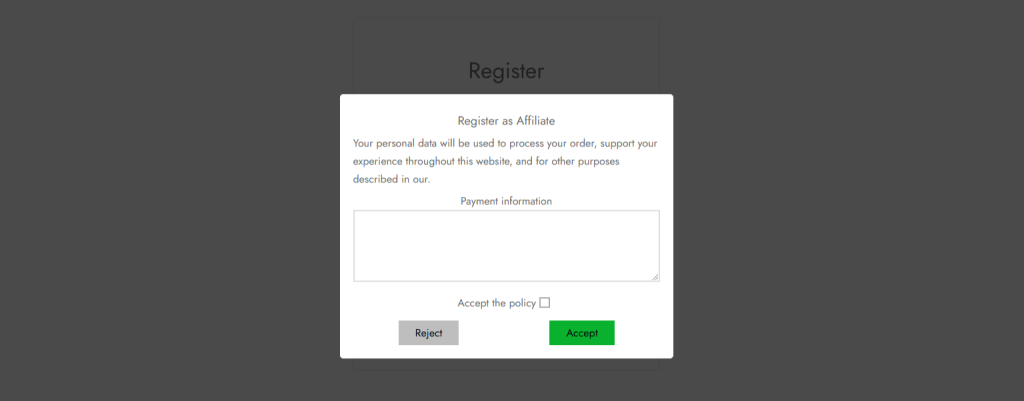
- When you register their account: Simply register an account as usual, right before the final step, the affiliate popup will show asking if the user want to register as an affiliate.
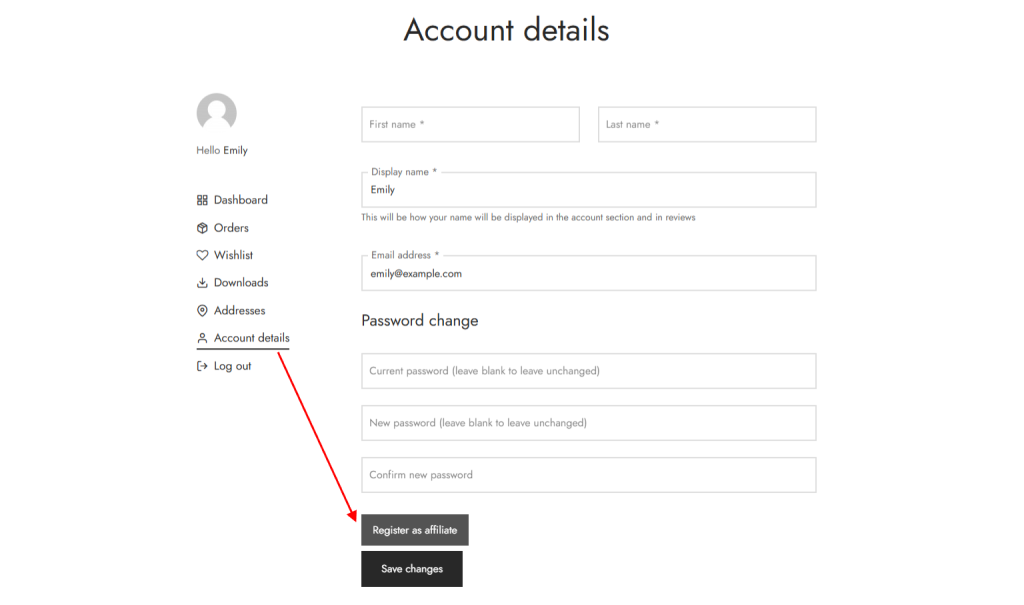
If you have an account already, they can still register under their My account >> Account Details
Access the Affiliate Dashboard
Once approved, log in to your account and access the Affiliate Dashboard at the URL /affi-affiliate/ or from the My Account section.
Dashboard Features:
- Generate Link: Copy your unique affiliate link.
- Performance Report: Track visits, orders, and earnings.
- Product Links: View and share affiliate links for specific products.
- Transactions: Monitor order details and affiliate commissions.
- Notifications: Stay updated on program changes, rank promotions, and payments.
Payouts:
- Submit withdrawal requests when the minimum balance is reached.
- Manage payment details and track payout history.
Step 4: Share Your Affiliate Links
- Use your unique affiliate link or product-specific links to share via:
- Social media platforms (configured by the admin).
- Email or personal messages.
- Blog posts or websites.
- Promote products effectively to increase referrals and earnings.
Step 5: Monitor Your Performance
Use the reporting tools in the Affiliate Dashboard to review: Total visits, orders, earnings, outstanding balance and paid commissions.
Step 6: Request Payouts
- Once the minimum payout threshold is reached, submit a payout request via the dashboard.
- Enter the withdrawal amount and review fees before submitting.
- Track payout status in the “Payout” section of the dashboard.